

Documentation
Welcome and Goodbye
A welcome card when somebody joins, a starting role handed out automatically, and a goodbye message when they leave — each set from the admin console.
Three things can happen at your server's door: a starting role for every new member, a welcome card when they arrive, and a goodbye when they leave. Each is set from the admin console. The welcome card is on from the start; the auto-role and the goodbye are off until an admin sets them.
 Abyssused/menu
 Abyss
Good to see you — Staff Sergeant · Level 24
▱▱▱▱▱▱▱▱▱▱▱▱▱▱ 4 / 349 XP
 $12.9K ·
 $6.62/hr
 Settings ›
 Joining
 Auto-role — Give every new member a role automatically
 Goodbye — Post a message when somebody leaves
 Welcome — A picture card when somebody joins
Asbern v0.9.16 · Docs
Settings › Joining
Auto-Role
Auto-role, under /menu › Other › Admin › Settings › Joining, gives every new member a role the moment they join. Pick None to turn it off. The bot needs Manage Roles, and its own role has to sit above the role it hands out — the form refuses a role it could not give.
Welcome Card

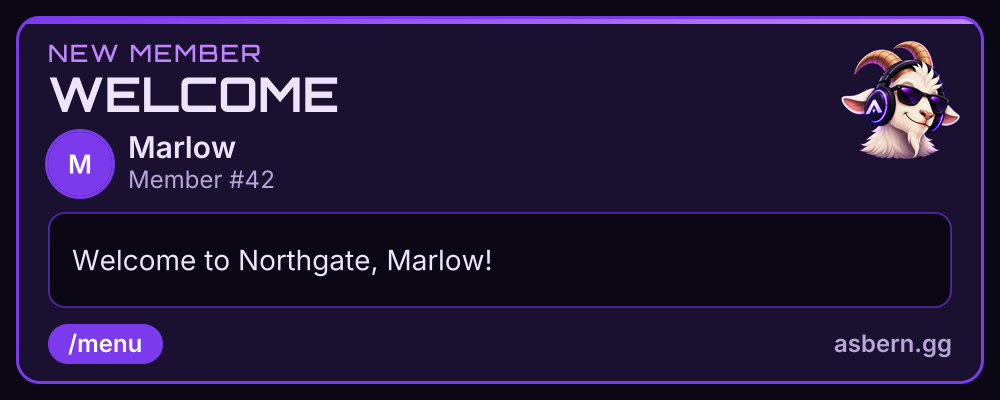
Welcome
Welcome is on unless you turn it off, and it replaces Discord's own join message: while the card can post, Asbern hides Discord's message, and gives it back if you turn the card off. It posts in the server's system channel unless you choose another. A member your verification or Discord's own rules screening holds at the door is welcomed once they are let in.
The card is a picture when somebody joins: their avatar and name, a big
word across the top (WELCOME unless you change it), a line underneath and their member number. The
line starts as "Welcome to {server}, {user}!" and can be up to 100 characters, using {user},
{username}, {server} and {count}. On the picture {user} is their name, because a picture cannot
hold a mention. An accent colour, written as #rrggbb, colours it in.
A line too long to fit the picture whole is posted as the card's heading instead, so nothing is cut off. Saving shows the line as it will read, and the picture needs the bot to have Attach Files in that channel.
Goodbye
Goodbye posts a message in a channel you choose when somebody leaves. Write it with the same
placeholders — {user}, {username}, {server} and {count} — and saving shows a preview as if you
had left. With no message written, nothing is posted.
A Gate Before the Welcome
If new members have to prove they are a person before they see the server, that is Verification.
What it Costs
Nothing. Asbern is free: every feature on this page is included in every server, and no card is needed.
Related
- Verification — a gate new members pass first.
- Your Bot, Your Look — the bot's own name and picture in your server.
- The Admin Console — where every setting lives.
Emoji graphics are Twemoji, used under CC-BY 4.0 — licence and attribution.