

Documentation
Member Profile and Settings
Each member's own corner of the bot — their nickname, the public card others open, gifts, and the controls over what the bot keeps about them.
Every member has a profile that belongs to them alone: the card other members can open, and the settings that decide what the bot keeps about them. Nothing on it is an admin's to change.
 Abyssused/menu
 Abyss
Good to see you — Staff Sergeant · Level 24
▱▱▱▱▱▱▱▱▱▱▱▱▱▱ 4 / 349 XP
 $12.9K ·
 $6.62/hr
 Settings
 Nickname · not set — Discord shows your username
Discord lets no bot rename the server owner — change it in Discord.
 Appeals · not set up — staff have not set up appeals here yet
 Birthday · not set — an admin has birthdays off here
 Stop counting my activity · counting on
We count your messages, voice minutes and which menu doors you use.
 Clear History — how to delete your data
 Your card is public: rank, level, XP, board standing, achievements,
net worth, messages, voice hours and join date.
To have your data deleted, email support@asbern.gg.
Asbern v0.9.16 · Docs
Settings
Settings
/menu › Profile › Settings holds one row for each thing a member controls:
- Nickname — Change sets your nickname in this server; leave it blank to go back to your username. The colour and icon beside your name come from your server roles.
- Appeals — ask your staff to reconsider an action taken against you. Where staff have not set appeals up, the row says so and its button is greyed out. See Appeals.
- Birthday — save your day and month for the server's birthday wishes. The row is greyed out where an admin has birthdays switched off.
- Stop counting my activity — stops this server counting your messages, your voice minutes and which menu doors you use, from that moment on. Resume starts it again.
- Clear History — your watch history and your game server history, cleared on one press each. Only the member they belong to can press it.
To have the rest of your data deleted — money, XP, game progress and statistics — ask support. There is no button that erases it: a person deletes it on request, and the Privacy Policy gives the address and says exactly what goes and what is kept.
Your Public Card
Abyssused/menu Abyss
Good to see you — Staff Sergeant · Level 24
▱▱▱▱▱▱▱▱▱▱▱▱▱▱ 4 / 349 XP
$12.9K · $6.62/hr
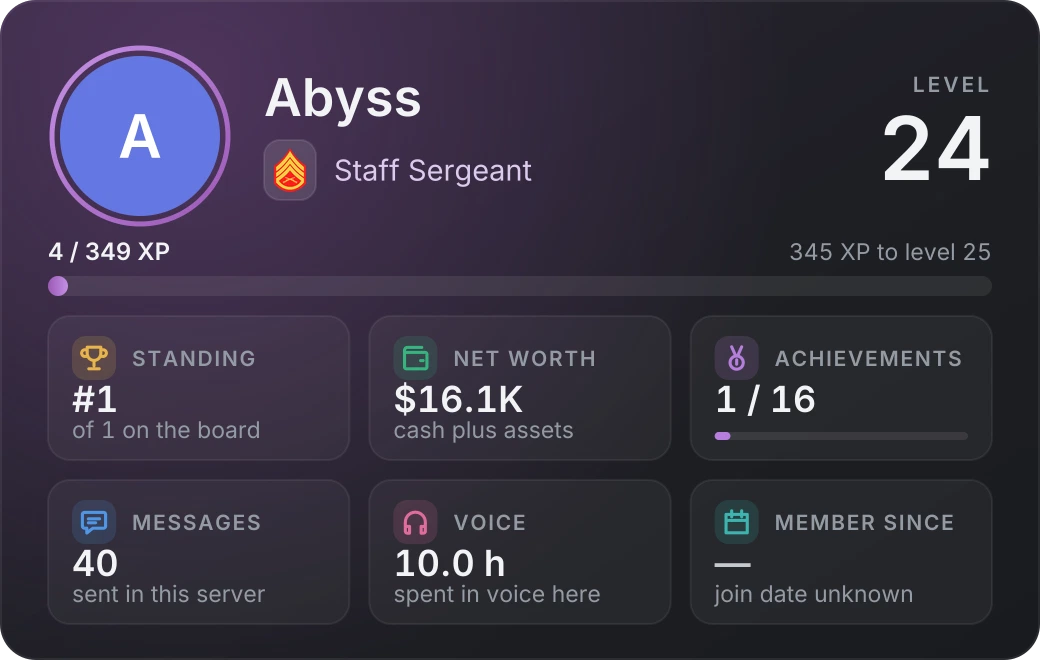
Abyss · Staff Sergeant · Level 24
 Send money · no recent gifts — others send to you here
Profile Visibility · public — anyone can open this card
Asbern v0.9.16 · Docs
My Card
/menu › Profile › My Card shows you exactly what other members see when they open your card: your picture, your rank, level and XP, your place on the level leaderboard, how many achievements you hold, your net worth, your messages and hours in voice, and the day you joined. Never your cash, your money history, your watch history or your settings. With activity counting switched off, the card says so in place of your messages and voice.
- Profile Visibility makes the card public or private. Others open a private card to a short notice that shows nothing about you except the row for sending you money.
- Members open each other's cards from the Leaderboard and from the Members search on the Other tab. Opening a card costs nothing.
Sending Money


Gift
Send money sits on every card that is not your own. It moves whole dollars of your cash to that member: final, with no fee, and in their wallet at once. The room sees a short card that pings only them. On your own card the row is greyed out, and shows the latest gift you received and the latest you sent instead.
What it Costs
Nothing. Asbern is free: every feature on this page is included in every server, and no card is needed.
Related
- Achievements — the badges your card shows.
- Your Server’s Currency — every way money comes in, gifts included.
- Server and Member Statistics — what Stop counting my activity stops.
- Achievements, Leaderboards and Daily — the rest of the Profile tab.
Emoji graphics are Twemoji, used under CC-BY 4.0 — licence and attribution.